Showing posts with label digital signage. Show all posts

Friday, November 22, 2013

What Does The Fish Say

You Won't Hear These Fish But They Have 
Something to Say

If you've ever been confused about which way forward and aft are on your Norwegian Cruise Line ship, these fish can tell you which way to go. The fish are swimming towards the forward (bow) of the ship. So when you step outside your cabin or turn down the corridor, just check the direction of the fish relative to the location on the ship that you want to go.


Finding Your Way Onboard


As ships get larger and more complex, it can be confusing to get from one location to another.   The cruise lines have employed various technologies to make finding your way a breeze.   The best improvement is the "way finder" which was introduced on Royal Caribbean Oasis and Allure of the Seas.  This touch screen allows you to map your route, find your current location, find out what's currently happening and much more.  They are located throughout the ship nearby elevators.

Digital signage is a big advancement which is being adopted on other ships and cruise lines.   Read this article to find out about the largest ship afloat: Navigating the Allure of the Seas

This is one of the features included in the Royal Advantage upgrades fleetwide.
 
What to Do 

While navigation is an important capability with the digital signs, equally important is helping you plan your day. On Disney Dream for example, you can find hours of operation and movie selection for Buena Vista Theatre, you can learn about It's a Small World Nursery and their hours of operation, and find out when and where your favorite Disney characters will be making an appearance.

When & Where to Eat

The first to pioneer relaxed dining times was Norwegian Cruise line with their Freestyle Dining program.   At first you'd have to call to find out if there was availability, but they were among the first to implement digital touch screens to assist you in planning your meals.

These are just a few of the ways you can use to navigate the cruise ships of today.  We'll complete the story in another article.

Tuesday, January 4, 2011

Navigating the Allure of the Seas

Who's Afraid of
The Big New Ship?

In this article, we'll try to alleviate your fears about finding your way on the largest ship afloat ... Allure of the Seas.
 
Welcome Aboard
Allure of the Seas

Navigating the Ship

Allure of the Seas has 16 decks which can be a little daunting at first, but you will find that this ship is one of the easiest ships to navigate.   There are several reasons why navigating the ship is easier than you might imagine.

When you embark the vessel, you'll be given a pocket guide to the Allure of the Seas.  It has the usual fold-out map of the ship as you might expect, but  it has much more than that.  It is a miniature guide to all that the Allure has to offer.   You will refer to this pocket guide throughout your cruise. This is just the beginning of the ways Royal Caribbean assists you in navigating the ship.

Where is Chris?  Let's check the digital sign...
Digital Signage

Royal Caribbean had the passenger in mind when building the Allure of the Seas.  We've heard about many innovations, such as the Neighborhoods, the Zip-Line, and AquaTheater, but perhaps the biggest innovation was the various technologies deployed throughout the ship.
  • Get up-to-the-minute, real-time communication for departure information, restaurant availability, entertainment information, mustering and more.
  • Use the interactive screens to map your way to virtually anywhere on the ship.
Touch the screen to begin navigating the ship.   Unlike most ships, that just have the floor plan of the deck you are on, you'll be able to map from your current location to another point on the ship, even if it's on an entirely different deck.

Real-time Planning
The captain on the Azamara Journey told us that the digital signage is intelligent.   Not only will it show you the navigation to your destination, but it will provide an alternate route if the situation is warranted.  For example, if there are already a number of people waiting for an elevator in one location, it will route you to another elevator where you won't have to wait.  Now, that's innovation!!

Standard Deck Layout Signs

I know what you are thinking ... what happens when the computers go down?   There are still the usual deck layout signs for those that don't want to play with a touch screen.  They aren't as much fun or efficient, but they will do the trick, especially if the computer goes down or power is out.
Deck Layout

Of course, Royal Caribbean built in redundancies for power and computers, so hopefully we won't have to write any articles about those situations in the future.

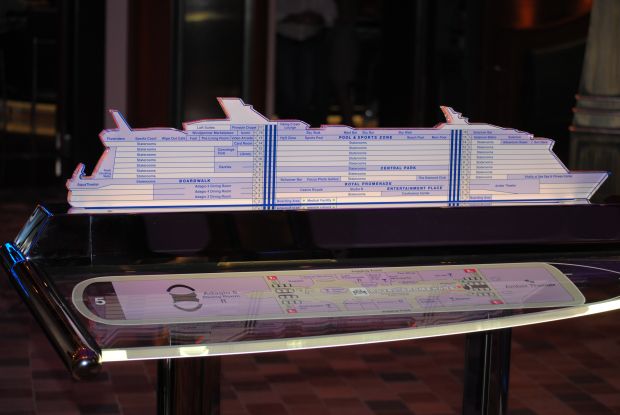
You'll find the 3-D ship deck plan near the elevators, so that too can be checked while you wait for the elevator.   Where is that... forward or aft?

 SIGNS SIGNS ... 
EVERYWHERE SIGNS

You'll find directional signs , such as the one shown here to the left, in various public areas of the ship (for example along the Royal Promenade).   These will direct you to nearby attractions, restrooms, etc.

"Signs, signs, everywhere signs..."  words from a famous song years ago.  In that song, it goes on to say "can't you read the signs?"  Well, fear not, even if you aren't by a sign, odds are that if you look puzzled, a friendly crew member will be glad to help you find your destination.    Once you get your bearings of a few major landmarks on the ship, you shouldn't have any difficulty navigating.